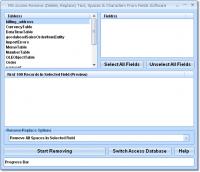
This software offers a solution for users who want to remove or replace certain characters in their MS Access tables. This software offers over 25 methods of changing records. Characters such as spaces, enters, tabs or any user-specified characters.
This software offers a solution for users who want to remove or replace certain characters in their MS Access tables. This software offers over 25 methods of changing records. Characters such as spaces, enters, tabs or any user-specified characters can be addressed. Also, character types such as alphabetical, non-alphabetical, numeric and non-numeric can be considered. Finally, text at a certain length/position can be changed. By instantly altering multiple records, this software will save you hours of time of having to change text manually by hand. Access 2000 or higher required.
Features include: Remove All Spaces in Selected Field, Replace All Spaces in Selected Field With..., Remove Extra Spaces at Beginning of Selected Field, Remove Extra Spaces at End of Selected Field, Remove All Spaces Except for Single Spaces Between Words in Selected Field, Remove Enters (Carriage Returns) in Selected Field, Replace Enters (Carriage Returns) in Selected Field With..., Remove Tabs in Selected Field, Replace Tabs in Selected Field With..., Remove Alphabet Character(s) in Selected Field, Replace Alphabet Character(s) in Selected Field With..., Remove Numeric Character(s) in Selected Field, Replace Numeric Character(s) in Selected Field With..., Remove Alphanumeric Character(s) in Selected Field, Replace Alphanumeric Character(s) in Selected Field With..., Remove Non-Alphanumeric Character(s) in Selected Field, Replace Non-Alphanumeric Character(s) in Selected Field With..., Remove User-Defined Character(s) in Selected Field, Replace User-Defined Character(s) in Selected Field With..., Remove All Text After User-Defined Character(s) in Selected Field, Replace All Text After User-Defined Character(s) in Selected Field With..., Remove All Text Before User-Defined Character(s) in Selected Field, Replace All Text Before User-Defined Character(s) in Selected Field With..., Remove First x Character(s) in Selected Field, Remove Last x Character(s) in Selected Field, Remove All TextRequirements:
MS Access 2000 or higher.
Operating system:
WinXP,Windows2000,Windows2003,Win98,WinME,Win95
Limitations:
None
Release notes:
New Release

MSSQL to MySQL database converter software converts MSSQL database, even tables are stored at new location or overwrite the existing MySQL database. MSSQL to MySQL table migration utility converts table and stores that database at specified location.
Price: $45, Rating: 8.33, Downloads: 195
Download

Do you have such kind experience that you can not view the complete SQL Script because of the reason with "WITH ENCRYPTION" when you view the Stored Procedure, View, Trigger and Function of MS SQL SERVER? If yes, the DecrypSQL can help you.
Price: $79.95, Rating: 9, Downloads: 148
Download
SQL SP Generator is aSQL Stored Procedure Generator add-in for SQL Server Management Studio.
Price: $ 19.95, Rating: 10, Downloads: 136
Download 
 MS Access Remove (Delete, Replace) Text, Spaces & Characters From Fields Software 7.0 details
  Text, Spaces & Characters From Fields Software 7.0.png)